
The problem
Restaurants want their own ordering channel, and customers want to know what they're getting.
- A static menu doesn't sell. It doesn't show offers, track orders, or remember the customer.
- Third-party apps take a cut, so restaurants want a channel of their own.
- Customers rarely come back without a reason: loyalty, offers, or an easy reorder.
The goal: a digital menu that works as the restaurant's ordering channel and connects to the Qoodz loyalty app.
My role
Product designer, research to final screens. I researched the problem, mapped the flows, and designed every screen, in under a month.
The process
01 · Discover
Start from how people actually order food.
- Review of how restaurants sell today and what customers expect from food apps.
- The ordering decisions that matter: what's on offer, how long it takes, delivery or pickup, where's my order.
02 · Define
Three product bets.
- Offers belong on the first screen. Discounts and best sellers shouldn't wait behind a tap.
- Delivery or pickup is one switch, with the time shown right there.
- The menu should lead to Qoodz. The Qoodz app is introduced at checkout, where the customer is most engaged.
03 · Design
Four flows, one job each.
01 · Browse
A menu that sells from the first screen
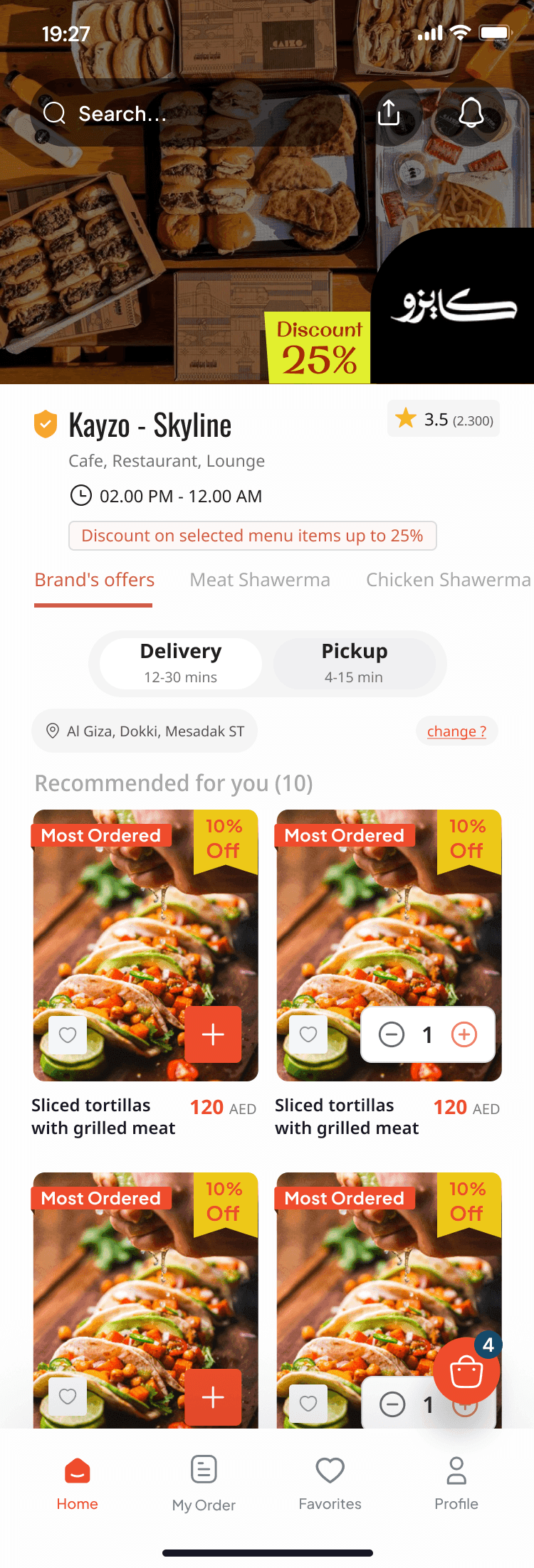
Offers and best sellers are visible before the first scroll.
- A discount banner and a Most Ordered tag on the home screen.
- Delivery or Pickup is a single switch, with the estimated time on each option (for example 12–30 min vs 4–15 min).
- Item detail shows price, rating, delivery time and a quick add, with a sticky checkout bar showing the running total.
02 · Order
From cart to confirmed
Three screens from cart to a confirmed order.
- Location on a map, with search and "use current location."
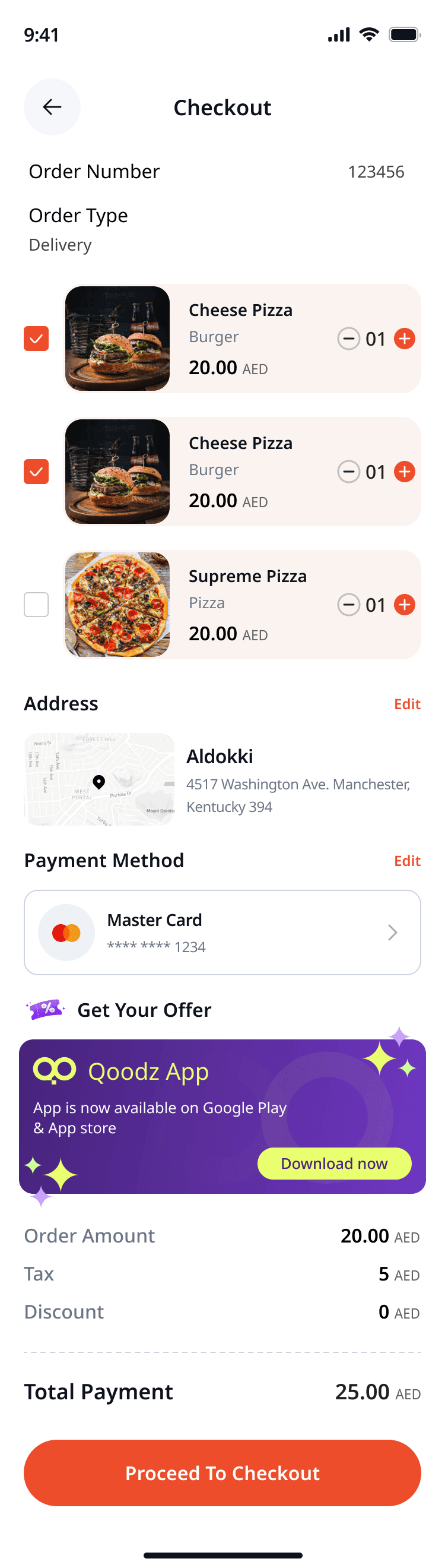
- Checkout shows address, payment method and a full price breakdown: amount, tax, discount, total.
- The Qoodz App banner sits in checkout, with a direct download button for Google Play and the App Store.
03 · Track
Always know where the order is
After ordering, the customer should never wonder.
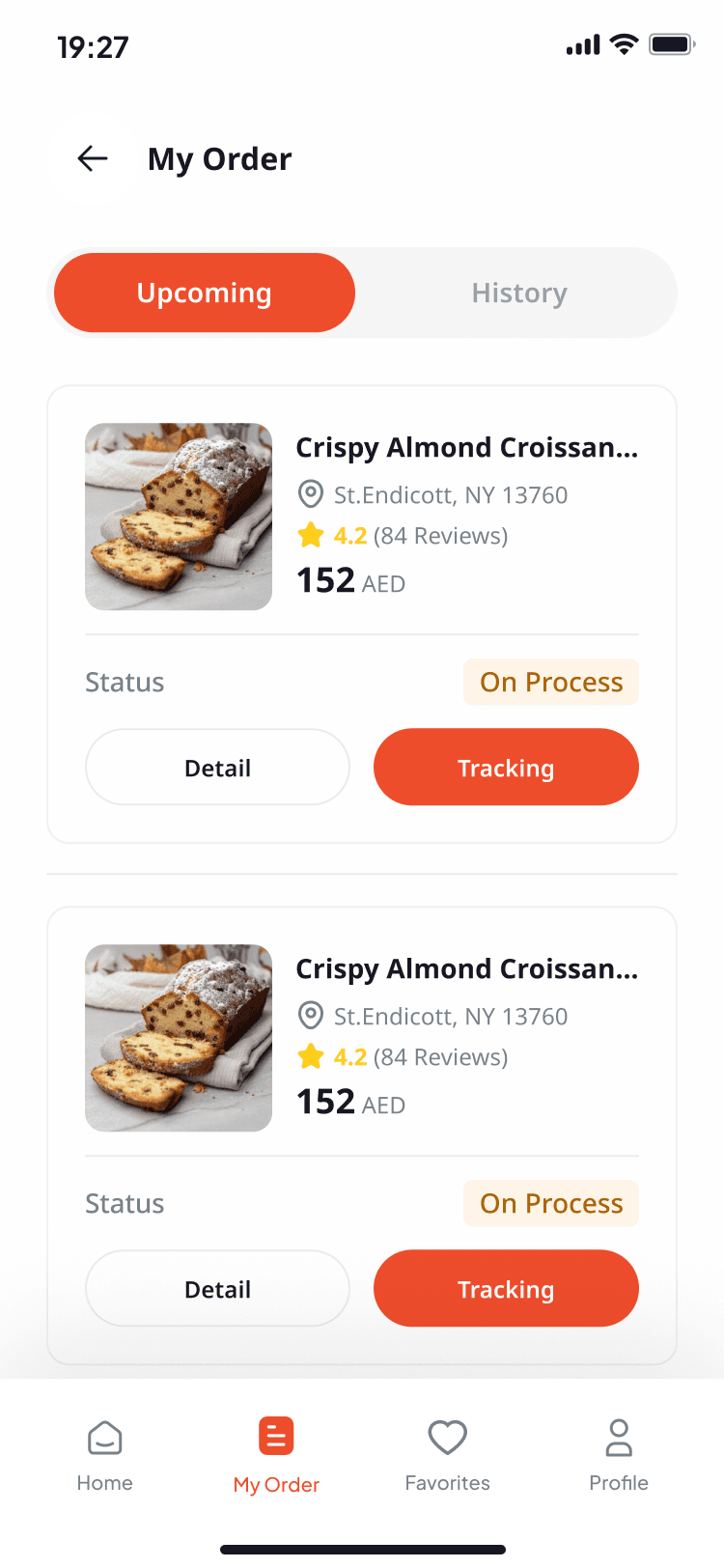
- Upcoming and History tabs separate active orders from past ones.
- Live tracking shows the route and the delivery estimate.
- A status timeline with four steps: order placed, preparing, being delivered, completed.
04 · Pay
Cards and payment
- Save a card once and set a default payment method.
- Adding a card is a short form, then a clear success confirmation.
04 · Hand off & ship
- Screens, states and components prepared in Figma for development.
- Tasks tracked and handed off in ClickUp / Notion / Jira.
- Live with 10+ restaurants and branches.
05 · Validate
Reviewed with the restaurant owner (the client) and Qoodz's product owner before handoff.
Results
- Live with real restaurants.
- 10+ restaurants and branches use the menu.
- Designed in under a month, from research to final screens.
What I learned & what's next
- Put the reason to order on the first screen. Offers and best sellers work better up front than behind a tap.
- Checkout is the best place to introduce loyalty. The customer is already committed.
- Next: measure how many orders move from the menu to the Qoodz app, and how many customers reorder.
Stack & tools
Design & product
- Figma
- AI tools (design and writing support)
Collaboration
- ClickUp / Notion / Jira (tasks and handoff)